
-
You have chosen to add a new payment device of Type “CCV Cloud”
-
The following screen is shown:
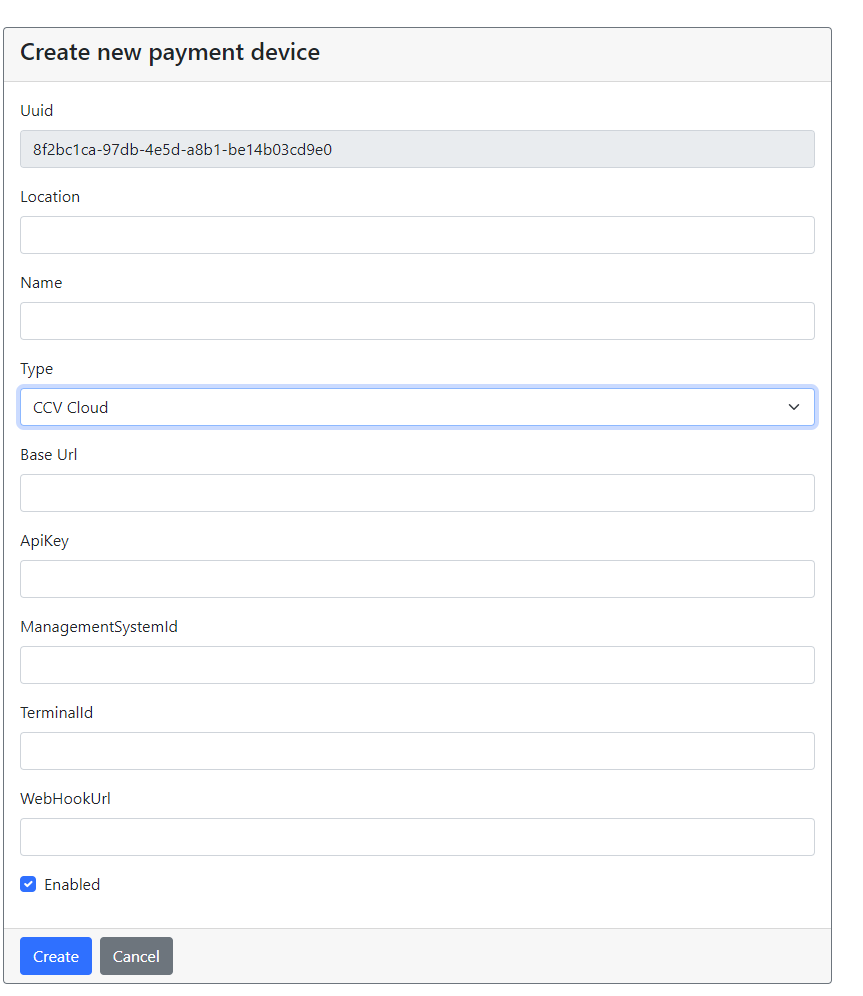
|
Property |
Description |
|---|---|
|
Uuid |
Automatically generated |
|
Location |
Location of the terminal, e.g. store name |
|
Name |
Name of the terminal, this description is shown in the POS, choose a description which store employees will recognize. |
|
Type |
CCV Cloud |
|
Base Url |
https://api.psp.ccv.eu/api/v1 – fixed value For Test terminals: https://vpos-test.jforce.be/vpos/api/v1 |
|
ApiKey |
The API key as Assigned by CCV (information provided by CCV) |
|
ManagementSystemId |
GrundMasterNL For test terminals: |
|
TerminalId |
The terminal id as assigned by CCV (information provided by CCV) |
|
Webhook |
https://webhook.aiden.eu – fixed value |