
Before continuing, make sure RetailPro Server is installed correctly.
-
Start the B1 ProSuite Software Platform application if it is not already running.
-
In the menu above, choose Packages > Applications.
-
Select the RetailPro Server to be configured.
-
Click on “Open”.
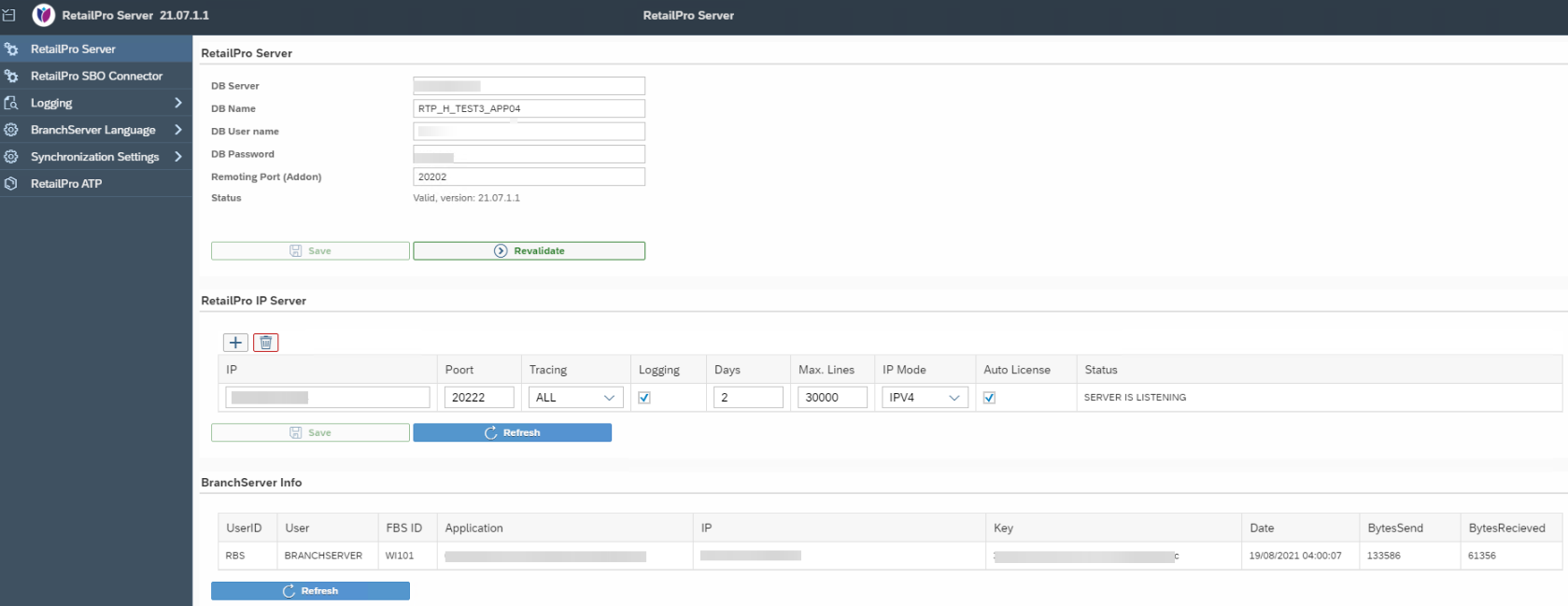
This screen consists of 3 parts:
-
RetailPro Server Settings of the SQL database for the RetailPro Service.
DB Name will be the name of the RetailPro Database. Make sure an unique name is filled in. Do not use the same name as the SAP Business One database
-
RetailPro IP Server Settings for the communication from the Branch Servers to the RetailPro Server. Specify the IP Address and communication port to accept incoming connections from Branch servers. Also specify the desired log levels (none, all, errors or events).
Important
After save the Status changes to "SERVER IS LISTENING". Any other status displayed is incorrect.
-
BranchServer Info All Branch Servers connected to this RetailPro server are shown here.